Author: Dave Strickler

  • Getting the Weather via an API the Easy Way

    If you’re coding and need to find the local weather, there are a lot of places you can go to get it. Most are complex and require you to create an account, and generally don’t offer much.

    If you’re looking for one that’s simple and based on GPS, try https://api.pulsewise.com/environment/weather/42.3388/-71.0726 , which is free for the first 1,000 calls per month and includes sunrise and sunset, too. Just swap the latitude & longitude coordinates for your own latitude & longitude, or if you leave them off, it will use your browser’s coordinates.

    This is just part of a set of tools I wrote at https://pulsewise.com or see the documentation.

    Its output is in standard JSON, and looks like this:

    {
    “success”: true,
    “timestamp_utc”: “2023-10-16 20:25:30”,
    “summary”: “Clouds”,
    “description”: “Broken clouds”,
    “temperature_current”: 56.68,
    “temperature_min”: 53.22,
    “temperature_max”: 59.11,
    “feels_like”: 55.53,
    “pressure”: 1003,
    “humidity”: 74,
    “wind_speed”: 5.75,
    “wind_direction”: 120,
    “wind_gust”: null,
    “sunrise”: 1697453864,
    “sunset”: 1697493703,
    “lattitude”: “42.33880000”,
    “longitude”: “-71.07260000”
    }

  • Letting a Customer Out of Their Contract

    I’ve run a few companies over the years, and one inevitably wants out of contact with you. Maybe they’re going out of business, or their business has changed and they no longer need your services. To make this decision, you need to weigh some data:

    • What is the value of the contract they want out of compared to your entire customer revenue stream? A small percentage or a large one?
    • What are the circumstances of their situation? Are they going out of business (inevitable) or just wanting a new vendor?
    • Are you ready to ruin the relationship with the people at that company if you insist they pay?
    • Will the outlay to collect the money (lawyers and collection agencies) be worth the value of their contract?

    The idea here is to look at the bigger picture. Sure, collecting revenue from a customer on a signed contract seems like your legal right, but what is the bigger picture? If you insist on it, it will create friction and a rift. Are these people you’re dealing with going to go to other places and have a permanent memory of your inability to work with them on this issue? Or will you be a reasonable vendor – someone they’d like to do business with again at their new job?

    Transactions create memories. The good ones can be memorable and often result in further business. The bad ones create memories that are hashed over and over, spreading the bad outcome. What kind of memory do you want to create?

  • Everything you could possibly want to know about Internet Email – Part 1

    In this series of posts, I’m going to share what I know about email. Over the last 20 years, I’ve learned to set up, diagnose, and do just about everything with email that you can imagine at any scale. In this series, I’ll be talking about email over the Internet, which uses protocols like SMTP and IMAP. I won’t be talking about the inner workings of commercial email software like Exchange.

    Understanding how email is sent
    As mentioned above, email works with a few protocols, and the one used to send email is SMTP. The idea here is the sender’s email is converted into a string of characters and is passed to an SMTP Gateway, typically at an ISP. This gateway receives this email transmission and relays it to its recipient, typically the receiver’s SMTP gateway. This hot-potato-relay idea allows SMTP gateways to forward an email to its next “hop” along the way. While you may think of an email being sent from me to you directly, it really takes a few hops before it reaches you. This is often why sometimes email arrives quickly, and sometimes it takes a few minutes. Email, by its design, is asynchronous.

    What happens when a gateway is down
    Email gateways are really just pieces of software that run on a server, listen for inbound connections, and forward an email to another gateway. And, like other pieces of software, they can go offline for any number of reasons. When they do, they’re unable to send or receive email, causing the delays you sometimes experience. The good news is that the SMTP protocol was designed to be resilient to servers going offline. So, if an SMTP gateway tries to send to another SMTP gateway, and the receiving gateway is offline, the sending gateway will pause and then try and resend the email. How long it will pause and how long it will keep trying are configurable by the person managing the SMTP gateway. Typically, the pause is about a minute, and the gateway will keep retrying for three days. If the sending SMTP gateway gives up sending the email after its predetermined time, the email is returned to its original sender. This is known as a “bounceback”, and has a numeric code associated with it that’s typically in the 500-600 range. I’ll explain these “result codes” in another post.

    Part 2 of this series will include more.

  • Figuring out US TIme zones

    Twice a year, many people in IT often get mixed up by time zones in the US. Understandably, as it is a little tricky to wrap your head around. Here are some tips when sorting it all out in the US.

    1. Timezones in the US change twice a year, in the fall and spring, with an offset of 1 hour in either direction.
    2. The exception to #1 are the States of Arizona (most of it) and Hawai’i – they never change their clocks like the rest of the US.
    3. In the spring, around March, the US switches to Daylight Savings Time, so we set our clocks forward 1 hour, giving us more light in the early evening.
    4. In the fall, around November, the US switches to Daylight Standard Time, so we set our clocks back 1 hour, giving us more light in the early morning.
    5. Part of the confusion is Daylight Savings Time and Daylight Standard Time both have the initials of DST. When abbreviating, it’s better to include your time zone. As an example: EDT is Eastern Daylight Time which starts in the spring, and EST is Eastern Standard Time which starts in the fall.
    6. These switches happen at 2:00am, so the clock becomes 1:00am in the fall or 3:00am in the spring.
    7. Be careful of #6 above. The swing appears to be two hours, but it’s not. Since time is relative, the switch is only 1 hour in either direction.
    8. Since the time switch is done by timezones, in the single hour that the East Coast sets is clocks backward in the fall by 1 hour, and Midwest hasn’t begun the change, clocks in New York will be set to the same time as Chicago; typically an hour apart. This hour-long cascade happens in each timezone as the local time changes around the US.
    9. Most other countries, but not all, also shift their clocks, but not on the same dates as the US. This causes some crazy scheduling twice a year with people in different countries than the US.

    If you want to get a bigger picture of all this, you can consult NIST which is the US standard for keeping time.

  • Consider Benevolent Dictatorships

    I’ve started, run, and sold a few successful companies. Each one was different from the last one because I was constantly learning. But early on, I took on a management method that I used throughout my career – I ran each as a Benevolent Dictatorship. Now, before you go looking it up on Wikipedia, it’s a term I used with my own definition.

    A Benevolent Dictatorship, in my terms, means I was very interested in other opinions on problems, as they often brought me to see new ideas. Others’ opinions added perspectives that fleshed out details I hadn’t previously seen, and, with rare exceptions, I relished each one. But regardless of how many I listened to, the proverbial buck stopped with me. I made the final decisions and was responsible for their outcome – good or, sometimes, unfortunately, bad.

    If you’re going to run any organization, there’s a temptation to run it “By Committee”, pushing away decisions, so it makes it easier to wag a finger when they don’t produce great results. But it’s harder to take responsibility. It’s harder to run a Benevolent Dictatorship. It’s harder to shoulder the responsibility and be ready to take on the consequences. But if you don’t, who will?


  • Why Use Zabbix Templates?

    There’s nothing as tedious as setting up the same type of server over and over, adding the same Items and Triggers. In any environment, we tend to use the same types of servers because we’ve standardized on them. It could be in your house (“My family is all on Apple products”) or at work (“We’re a Linux and Windows shop”).  So if you’re setting up 20 laptops, it’s the same Items and Triggers on each one.

    To handle this headache, Zabbix uses Templates to make the configuration easier. At the Host level, you can add Items and Triggers one by one or save yourself a lot of time an use the Templates field. Choosing a Template for the server allows the addition of pre-defined Items and Triggers so you don’t have to type them all in, but there an extra bonus. If you change the Template, the changes ripple out and affect all your Items and Triggers using that Template. Imaging configuring 20 Hosts, each with 30 Items, each with 60 Triggers, and realizing you made an error and need to update most of them – but if you use a Template you only have to make a few changes.

    My Zabbix server monitors hundreds of Hosts, but even if you only have a few, try a few pre-fined Templates to save yourself a lot of time. In a future post, I’ll show you how you can create your own Templates, and you’ll be stunned at their power.

  • Why Use Zabbix Global Macros?

    Once your Zabbix configuration starts to monitor for that a few hundred Items, you’re going to be relying heavily on Templates. Along with using Templates to replicate the monitoring of more than one server, you probably need to start using Global Macros.

    The concept of a Template is “write once, use many”, and Global Macros are very similar. An example might be a license key for an external service or the credentials for an internal service (there are better ways of storing secrets), perhaps a SQL database that is used just for Zabbix. Using these credentials and values scattered throughout your code is just going to give you headaches if they ever change, and we all know they will.

    The idea here is that the values are placed at a global level in your Zabbix configuration and then used anywhere you’d like. Need to change credential values? Just change it once in the Global Macros and the change ripples through Zabbix. An example is below of Global Macros is below.

    To use them, just put values in (mine are fuzzied out) and then use them throughout as you would any Macro. But instead of at the Macro value being attached to the Host, it’s defined everywhere. An example is below:

    When you save an Item like this, each time it runs, it will look for the value of the Macro called {$HOST_DNS} – saving you lots of configuration headaches, now and especially in the future as your configuration changes.

  • Why is Rebooting Linux Pointless?

    Spoiler alert: It’s not pointless.

    I’ve taken a lot of flack over the years in saying that it’s OK to reboot Linux. While you can read on the ‘net how it’s pointless to do so, a statement like that has too many nuances to be considered fact. A better statement would be to say that, in many cases, Linux doesn’t need to be rebooted (it’s not MS Windows, after all). Linux does an amazing job of recovering from runaway RAM issues and even out-of-disk issues. I’ve even seen CPU usage bring a Linux server to a standstill, only to have it recover after I’ve left it for dead.

    Linux, and all its flavors, is built on an amazing set of technologies, but it’s not perfect. Sometimes a good old-fashioned, quick reboot helps.

    Reasons for a reboot might be an upgrade to its installed software, security patch(s), or Linux itself. When logging into a Linux box that needs a reboot, it should notify you, so it’s pretty easy to know when to do it. And it’s also pretty quick.

    So the next time someone insists you don’t need to ever to reboot Linux, just smile and do it while they’re not looking.

  • Getting your Unifi Router Failover working

    One of my Unifi Gateways, a USG-Pro-4, is located in a house where the internet can go out in a storm. Since the internet is provided by Comcast, and it’s just “household grade”, there’s not much I can complain about. But we’ve all experienced an outage just when you need it the most.

    My traditional way of dealing with this is yelling around the house, “Internet is out – everyone go on your hot spots”. Typically it’s back online in an hour or so, and then I have to make sure everyone has switched back over to the house WiFi. What I’d really love is to get the failover port working on my gateway, but that seemed to be expensive and difficult to set up until now.

    What I’ve rigged up will cost you about $50 in parts and takes about 30 minutes to set up. Once it’s set up, the gateway will failover if the main connection fails, and it will failback (the opposite of failover) when your main connection is back online. In my setup with the connector linked to my iPhone, this failover only works if I’m in the house and my phone is fairly near this connector, but that’s about the only downside.

    I’ve accomplished this by buying a BrosTrend AC1200 WiFi to Ethernet Adapter  (about $50) connector, which consumes a WiFi signal, probably from your phone via your hot-spot, and turns it into a cabled ethernet connection. With the cabled ethernet plugged into the WAN2 port on your Unifi, and a simple configuration,  the Unifi gateway now sees the WAN2 port as having a connection to the internet if the WAN1 connection goes down.

    Basic Steps

    1. Configure your connector BrosTrend AC1200 to connect to your cell phone’s hotspot.
    2. With an ethernet cable, connect your connector to the WAN2 port of your Unifi Router.
    3. Configure the WAN2 port as a failover for the WAN1 port.
    4. With everything cabled and configured, simulate the failover by unplugging your main internet connection from the Unifi gateway.
    5. Wait about 30-60 seconds for it to failover to WAN2, and you can test your internet connection as you normally would.
    6. When you’re satisfied it’s working, plug back in the main internet connection to your Unifu gateway and watch ut failback.


    To configure the BrosTrend, just follow the instructions in the box. It’s pretty easy and consists of plugging in the unit, waiting for it to boot in a few seconds, switching your WiFi on your laptop to use the SSID that the BrosTrend just created, and following a few prompts to connect it to your phone’s hotspot. When it’s working, you’ll see a blue “Signal” LED on the BrosTrend remain solid, indicating a good signal to your cellphone.

    Then you can use any ethernet cable, including the one it comes with, to connect the BrosTrend to your Unifi Router’s WAN2 port. Remember, the BrosTrend will need power as well, but I’m assuming you have that close to your Unifi Router.

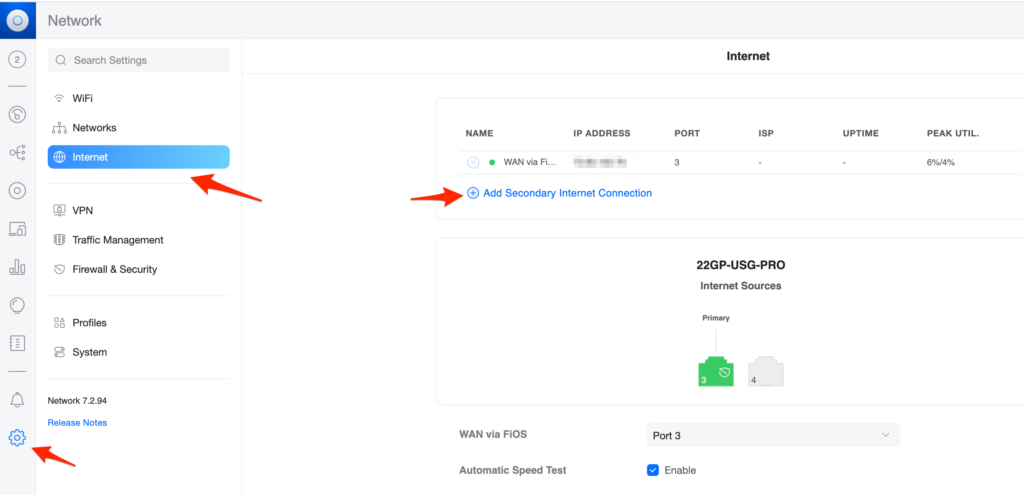
    Configuring your WAN2 port as a failover is so easy in the Unifi Controller console; you can miss it if you’re not watching for it. Go into your Console, click on the gear icon in the lower left, and then on “Internet: above. Then choose “Add Secondary Internet Connection”.
     

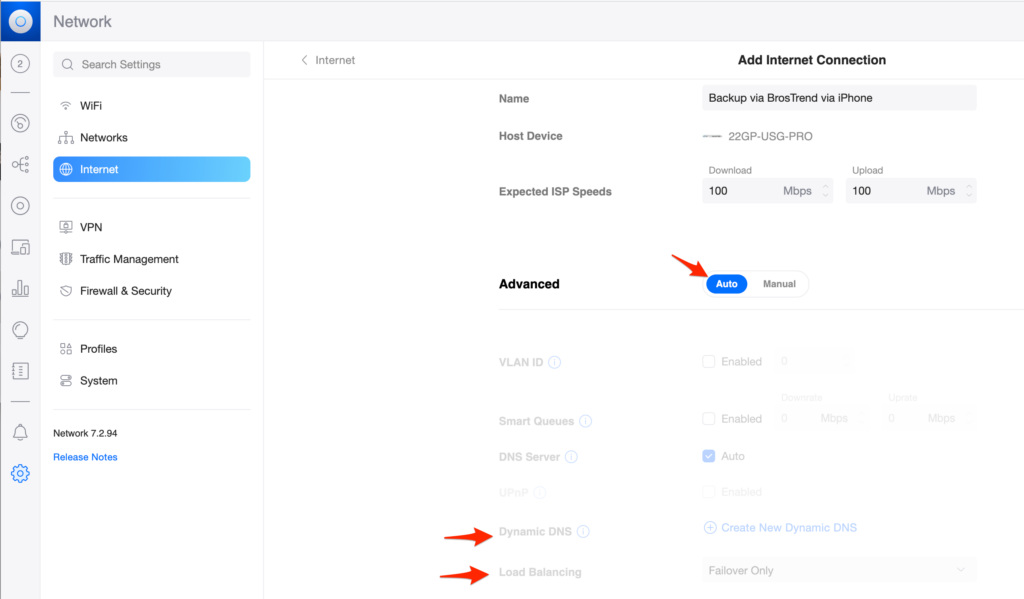
    Once you get the screen to add in a secondary connection, fill it in with a name that makes sense to you, fill in your guess at connection speeds, and choose “Auto” for the rest of the settings. If you’re using a Dynamic DNS, you can switch to manual and configure it, but in either “Auto” or “Manual” mode, it’s important that the “Load Balancing” be set to “Failover Only”. This needs to be done as there are only two modes, and the other, called “Balanced” will use your main ‘net connection half of the time and your iPhone for the other half. While that may be fun to experiment with, you’re going to max out your hotspot for no good reason. Setting it to “Failover Only” is the setting we want, which means it will only use this setting configuration if the main ‘net connection fails.
     

    Once you have this configuration saved, on the next screen, you will need to specify the port for this new BosTrend device to use. Port #4 is common as it’s the “WAN2” port on USG-Pro-4 routers. And again, make sure “Load Balancing” is set to “Failover Only”.
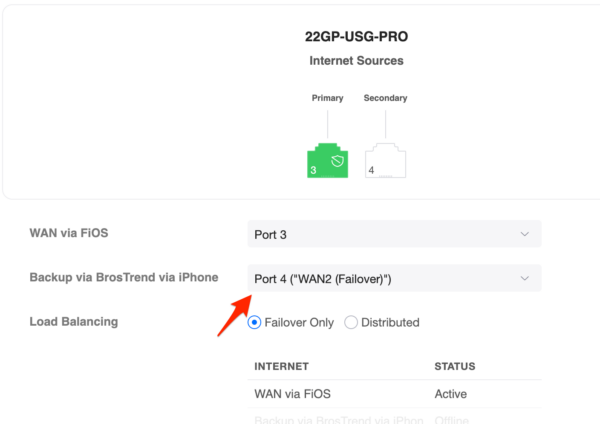
     

    After that, you’re all set. You should be able to simulate a failure with your main ‘net connection, and in a few seconds, the BosTrend should take over, using your phone’s hotspot for your entire network. Just reconnect your main ‘net connection, and the fallback should happen.

    If you get an error saying it can’t save your WAN2 settings, check the settings on your UGS-Pro-4 to make sure that Port #4 is enabled. If it’s disabled, it can’t be assigned to anything.

    Now you have a failover for your Unifi Router for about $50 and 30 minutes of your time. I hope you never have to use it, but you’ll thank me if you do.


  • Unifi Console sees existing Devices as offline

    With seemingly no changes, my network had a bad start to the day.

    Devices just started dropping off the Console, but the network was fully functioning. While not an emergency, as there wasn’t a network outage, I was “blind” as the Console wasn’t showing Devices, except for the USG4Pro itself and a few Clients.

    I waited for a good time (is there ever a good time), and I rebooted my USG4Pro, but this only had the situation worse as now nothing was showing up in the Console, and the connection to the ‘net stopped. Now this was an emergency.

    I then SSHed into my USG4Pro and, with the “info” command, found that it’s the connection to the Controller, which lives on the ‘net, was using a DNS address (I did this a few years ago). Using the “set-inform” command, I set it to an IP address, so it didn’t have to do the DNS lookup. Perhaps our DNS was down? Unlikely, but it was worth simplifying the network. Without a connection from the USG4Pro into my Controller, this could cause the issue.

    Unable to resolve the DNS address, so I set it to the Console’s IP address.


    With the IP address in place, I was getting an “Unknown[11]” error.
    With the new error of “Unknown[11]”, I was getting worried. When a vendor reports “unknown” in anything, it’s never a good sign.

    Since the IP address change didn’t seem to help, I powered-cycled the USG4Pro, hoping a full power cycle would pick up the changes as opposed to a soft reboot. That brought the USG4Pro back online as well as ‘net connectivity, but not the other devices (switches and APs). I then power cycled each of the other Devices, and they started showing up on the Console. Within a few minutes, the Devices started showing up in the Console.

    I have no idea what caused the initial problem or if the DNS-to-IP change solved it, but the emergency was over quickly.